Diagram Views
This feature allows you to create and manage multiple views of your database diagram, each focusing on different aspects or subsets of your data model. Perfect for presenting different perspectives of your database to various stakeholders.
Saving multiple views is a paid plans feature. On the Free plan, you can only filter tables and save these settings in the default view.
Overview
Diagram Views help you organize and present your database schema in different ways:
- Focused Views: Create views that show only specific tables and relationships relevant to a particular feature or module
- Stakeholder-specific Views: Tailor views for different audiences (developers, business analysts, executives)
- Progressive Disclosure: Start with high-level views and drill down into more detailed views
How to Create a New View
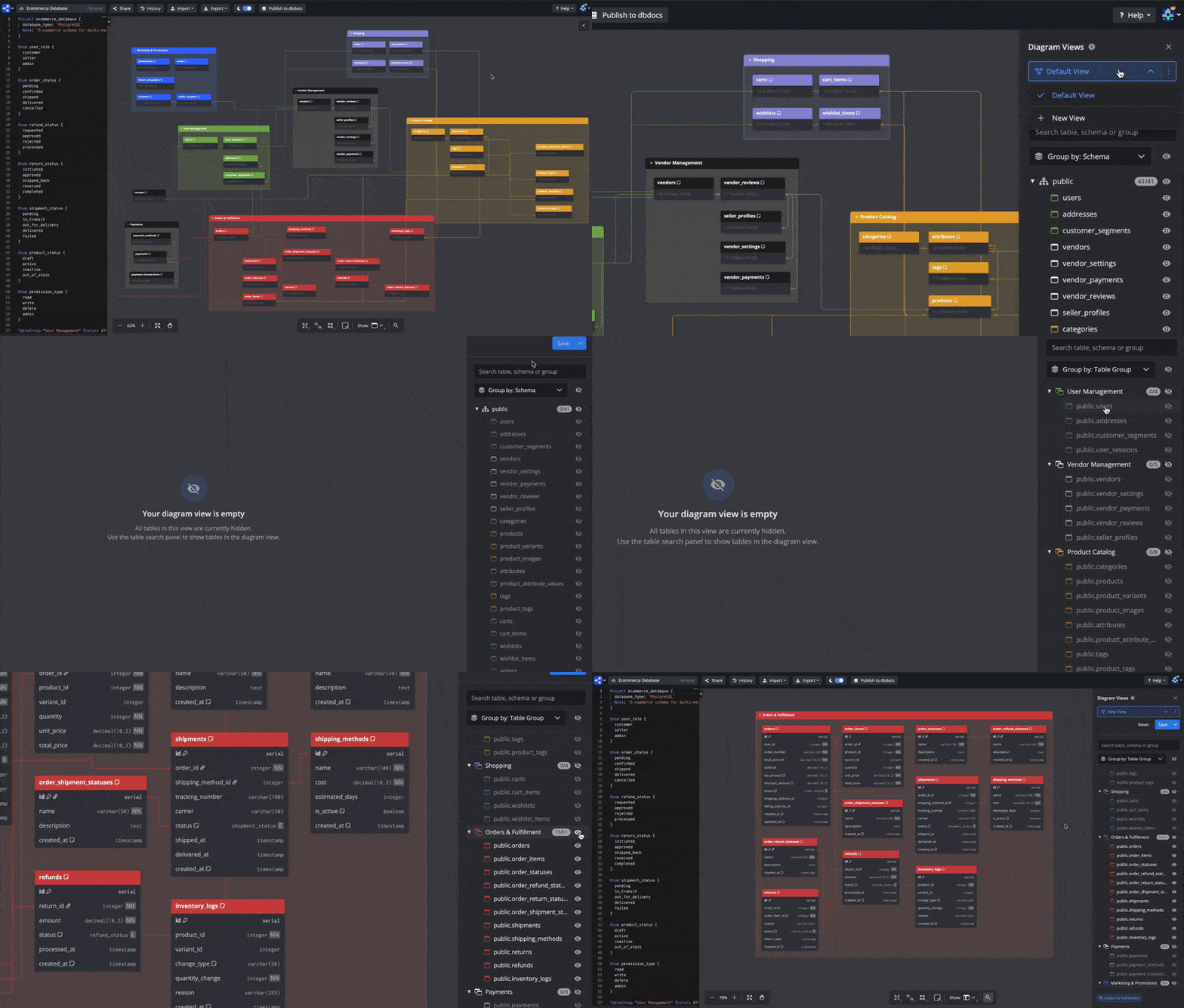
You can create diagram views via the UI editor or directly in your DBML code.
Via the UI
- Toggle table search panel (click expand button in top-right corner or press
Cmd/Ctrl+F) - In diagram views selector, select New View
- Choose which tables to include in your view
- Rename view with a descriptive name
- Save your view
Define Views in DBML
You can define diagram views directly in your DBML code. This is useful for version-controlling view settings, automating documentation, or sharing view configurations across a team.
Default view — persist your filter settings in code:
DiagramView Default {
  Tables {
    customers
    orders
    products
  }
}
Named views — available on our paid plans:
DiagramView "Sales Team" {
  Tables {
    customers
    orders
    products
  }
  TableGroups { sales }
}

DiagramView Engineering {
  Tables {
    users
    sessions
    events
  }
  Schemas { core analytics }
}
Wildcard — show all items in a category:
DiagramView Admin {
  Tables { * }
  TableGroups { admin config }
}
Views defined in DBML appear in the sidebar alongside views created via the UI. All view features — table filtering, positions, group collapses — work the same way.
For the full DiagramView block syntax, see the DBML syntax reference.
FAQs
Sharing
Q: Can I exclusively share a diagram view without letting them see other views?
A: No, you can't. All sharing mechanisms (inviting users, private mode, and password protection) work at the diagram level, not at the individual view level. When you share a diagram with a user, they will be able to see all views. Similarly, private/password protection settings apply to the entire diagram and all its views.
Q: Can I embed specific diagram views in a diagram?
A: No, you can't. When you embed a diagram, all views will be accessible via the iframe. The embed functionality works at the diagram level, so users can switch between all available views. We can consider implementing this use case if many users request it.
View Management
Q: Is there a limit to how many views I can create per diagram?
A: There's no specific limit, but views are stored as part of the diagram data. Very large numbers of views might impact performance, so we recommend keeping views to a reasonable number based on your actual needs.
Collaboration
Q: Do views sync in real-time when collaborating?
A: Yes, views are part of the diagram data and sync in real-time with other collaborators. When someone creates, modifies, or deletes a view, all collaborators will see the changes immediately.