39 posts tagged with "dbdocs"

View All Tags

⌨️ Introducing the dbdiagram CLI

You can now work with both dbdiagram and dbdocs from a single command line. The dbdiagram CLI syncs your local .dbml files with your diagrams and publishes documentation to dbdocs.io β€” from your terminal or CI pipeline, no app needed.

Keep your schema in version control, push it to update the diagram, and pull to bring web edits back into your repo.

What's new:

  • Sync diagrams both ways with push and pull β€” schema and table positions included
  • Publish docs to dbdocs.io with build document
  • Set up once with init β€” later commands run without repeating flags
  • Automate updates in CI with a DBDIAGRAM_TOKEN, no browser login needed

Example:

npm install -g dbdiagram
dbdiagram auth login
dbdiagram init --entry schema.dbml --diagram-id <id>

dbdiagram push # local DBML β†’ update the diagram
dbdiagram pull # diagram β†’ update local DBML

RunSQL support is coming next, so you'll design diagrams, publish docs, and test SQL queries from one CLI.

πŸ“š Learn more β†’

Please give it a try and let us know what you think.

πŸ—‚οΈ Diagram Views in DBML

We're excited to introduce DiagramView-as-code β€” a new way to define diagram views directly in your DBML code, with no UI action needed.

Your view settings now live right alongside your schema in DBML. This means your views are version-controlled alongside your schema changes, making it easy to automate documentation and share consistent view configurations across your team.

What's new:

  • Define a default view to persist your filter settings in code
  • Create named views for stakeholders: DiagramView "Sales Team", DiagramView Engineering
  • All diagram view filtering β€” work the same whether set via UI or DBML

Example:

DiagramView "Sales Team" {
Tables {
customers
orders
products
}
TableGroups { sales }
}

DiagramView Engineering {
Tables {
users
sessions
events
}
Schemas { core analytics }
}

Note: Named views (DiagramView <name>) are available on our paid plans. Free users can only filter tables within the default view (DiagramView Default).

πŸ“š Learn more β†’

Please give this feature a try and let us know what you think.

πŸ’½ Data Sample

Great news! We're introducing Data Sample β€” a feature that lets you add example data rows directly alongside your table definitions in DBML. Now your diagrams can show not just schema, but actual data, making them far more meaningful and useful for team communication.

Here's a simple DBML example:

Table plans {
id int [pk]
name varchar
price decimal

// define inside table definition with implicit column list
Records {
1, 'Free', 0
2, 'Pro', 8
3, 'Team', 15
}
}

// OR define outside table definition
Records plans(id, name, price) {
1, 'Free', 0
2, 'Pro', 8
3, 'Team', 15
}

Define sample data right in DBML, and your diagram instantly comes alive. You can import SQL INSERT INTO statements to auto-populate records, view them in the diagram with a single click, and export back to SQL for database seeding. This keeps your reference data and schema definitions in perfect sync across docs and deployment.


Why it matters:

  • Your diagrams explain themselves β€” team members see actual data shapes and values, not just column definitions.
  • Lookup tables finally have a home β€” define plans, roles, and other reference tables with their data, all in one place.
  • Catch schema problems early β€” real data reveals missing columns, type mismatches, and broken relationships before migration.
  • Convert existing data seamlessly β€” import SQL statements and auto-convert to Records for instant visualization.
  • Seed your database faster β€” export sample data to SQL and deploy immediately.

Note:Β Data Sample is available on all plans.

πŸ“š Read the full syntax docs β†’

Try it out and let us know what you think!


βœ”οΈ Introducing DBML Check Constraints β€” Enforce Data Rules with Ease

Great news! We've added support for Check constraints, allowing you to set rules on your table fields to enforce data qualityβ€”such as ensuring quantities are above zero or ratings stay within a range.

Here's a simple DBML example:

Table orders {
id integer [pk, increment]
price decimal [not null, check: `price > 0`]
discount decimal [not null, default: 0, check: `discount >= 0`]

checks {
`discount < price` [name: 'valid_discount']
}
}

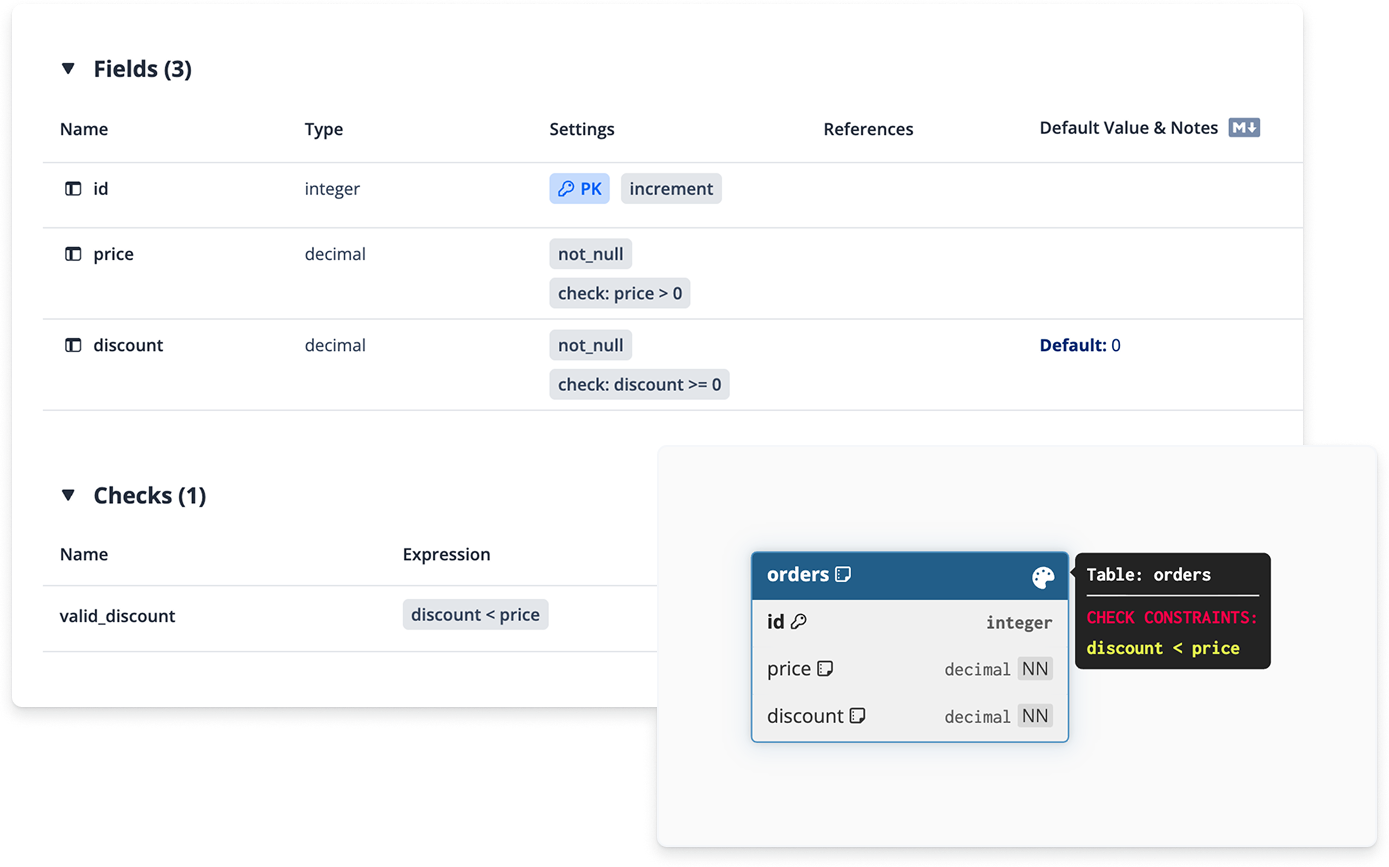
Previously, these had to go in notes, which meant they could disappear during SQL imports or exports. Now, define them right in DBML, import and export with accuracy, and view them in your ER diagrams and docs for clearer sharing.

DBML Check constraint

It's a simple way to make your databases more reliable and your documentation more informative. Update your diagrams now and start applying Check constraints!

πŸ“š Read the full docs β†’

We hope these enhancements improve your database design and communication experience. Try them out andΒ let us knowΒ what you think.


πŸ•’ New Feature: Wiki Changelog

You know that moment when you're reading database documentation and thinking "Is this documentation up to date?" πŸ€”

We just solved that.

We're excited to announce Wiki Changelog – a collection of features that show schema changes directly in your documentation pages.

Stay in your flow. Know what changed. When it changed. Who changed it.

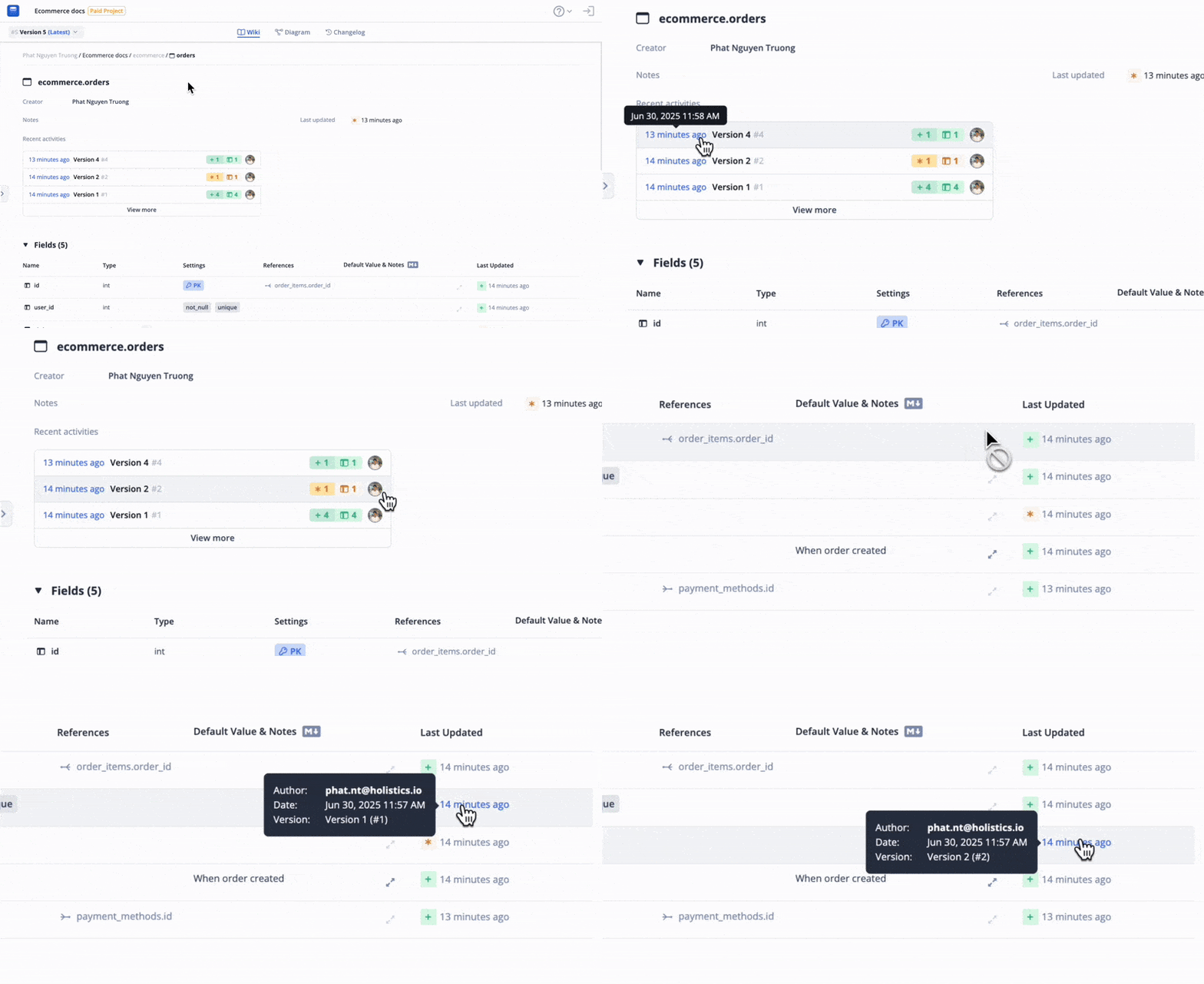
πŸ•’ Recent Activities & Entity Last Update​

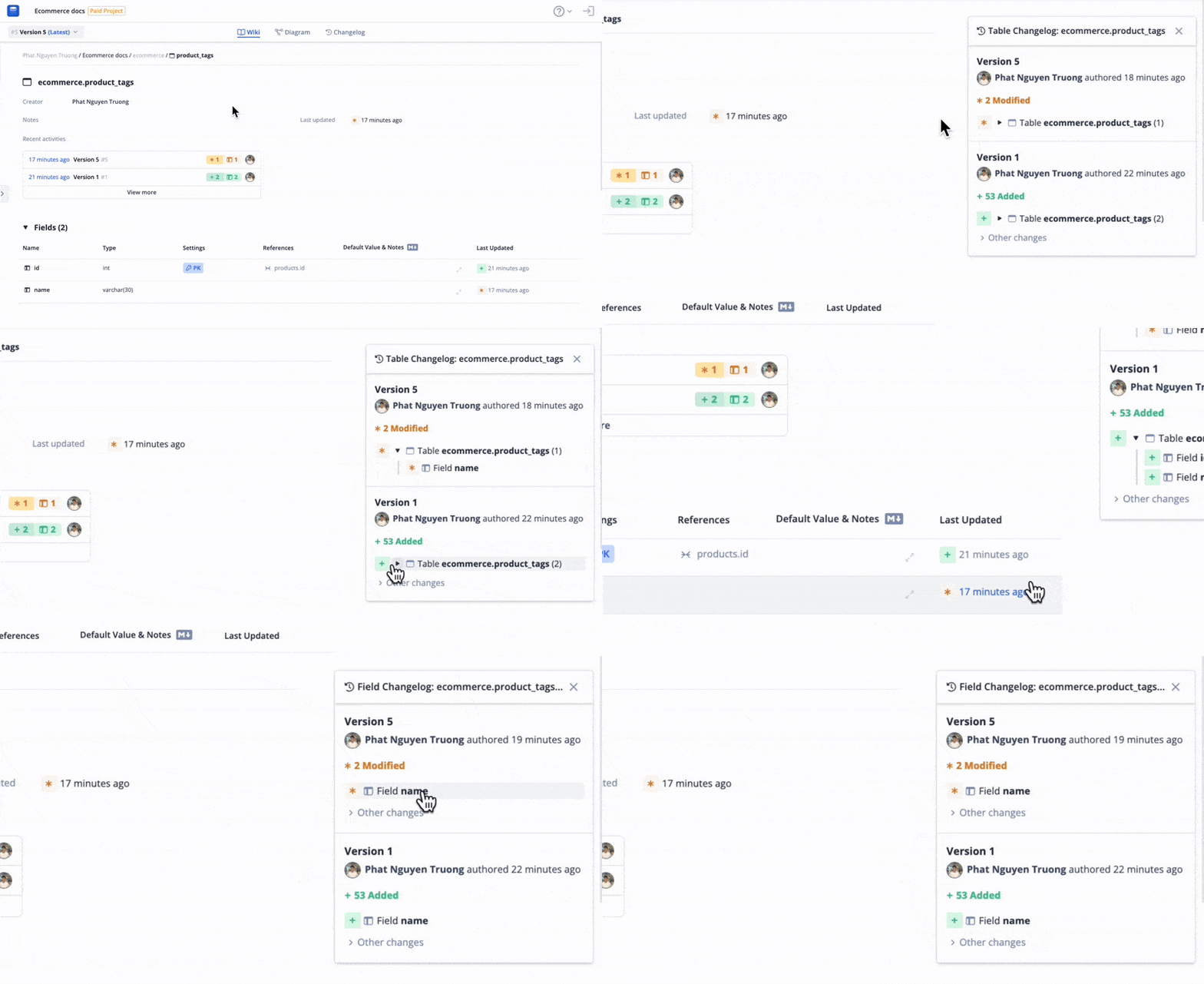
Get a quick glance at recent schema updates directly in your wiki pages. See at-a-glance timestamps on each table, field, and schema component so you can instantly assess how current your documentation is without digging deeper.

Recent Activities

πŸ”„ Entity-Specific Changelog​

Drill down into the evolution of individual tables, table groups, or fields. Each entity now has its own changelog so you can track specific changes over time and understand how particular parts of your schema developed.

Entity Changelog

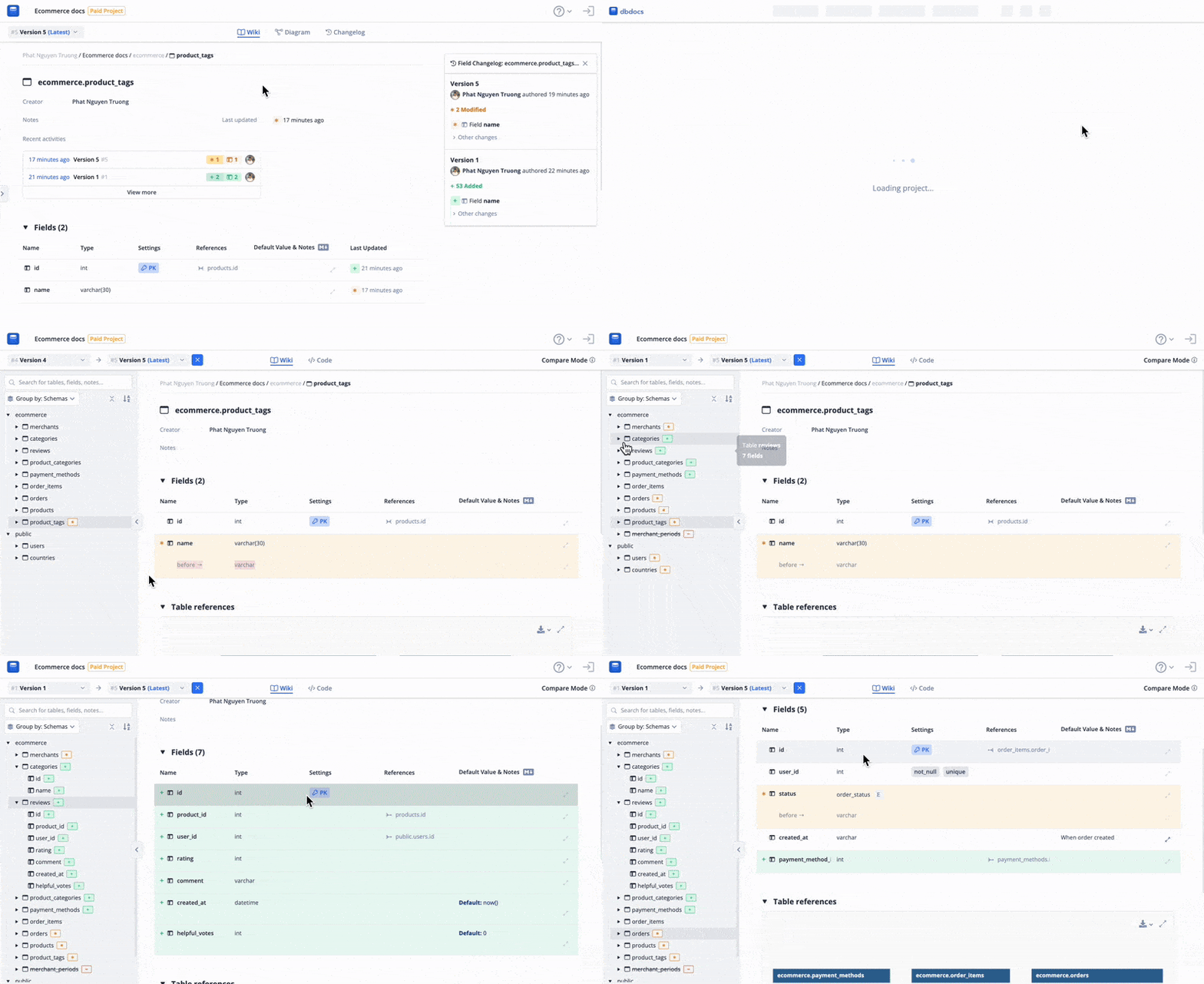
πŸ” Wiki Diff View​

Compare any two versions without leaving your documentation using Wiki Diff View. From here, you can toggle between familiar documentation style or raw code view.

Wiki Diff View

πŸ’‘ Why You'll Use It​

  • Debug issues: When something breaks or data looks wrong, quickly see what changed in specific tables or fields recently.
  • Share with teams: Point teammates to recent changes during discussions or code reviews.
  • Review before changes: Check recent activity on tables or fields before making your own modifications.
  • Track compliance: See who made what changes and when for audit trails.
  • Plan migrations: Understand change patterns before planning major schema updates.

πŸš€ Available Now​

Wiki Changelog is rolling out to all dbdocs users starting today. Check out the features in action at our live demo: Ecommerce - dbdocs.io or visit any of your existing documentation pages.

If you have any feedback for us, feel free to share it in this community post.